Renovation and extension
The installation exists, and so does the diagram — on paper, in the folder next to the board. You're adding three circuits, but you start by redrawing the entire existing board.
Every drawing program draws a new single-line diagram. The question is what happens when the diagram already exists — on paper in the folder next to the board, or as a PDF without a source file. In 1wire you upload a scan or a photo, and a few minutes later you carry on drawing in an editable diagram.
Redrawing becomes uploading
On the left, the diagram as you find it at the customer's: a plan from the folder next to the board, photographed with a smartphone. On the right, the same diagram in 1wire, a few minutes later — not as an image, but as real components. Every circuit, every circuit breaker and every symbol is a component you can select, move, complete and print.
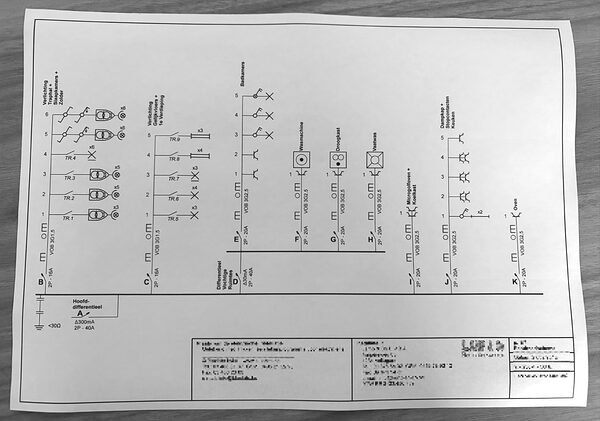
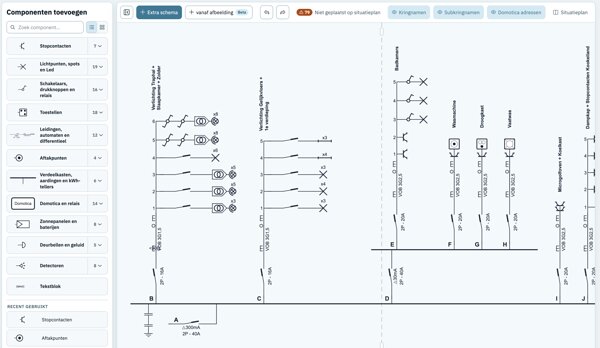
With a new installation everyone starts with a blank sheet, and there's nothing wrong with that. With an existing installation you start with a blank sheet and a diagram that already exists. That diagram is on paper in the folder next to the board, or in a PDF you can open but not edit. All you can do with it is look at it while you retype it.
That retyping is work that rarely ends up on an invoice. And it's exactly why a half-hour change turns into half a day.
The installation exists, and so does the diagram — on paper, in the folder next to the board. You're adding three circuits, but you start by redrawing the entire existing board.
An inspection report calls for an updated diagram. Rebuilding the old diagram just to add one residual current device is work that wasn't in your quote.
You take over an installation from a colleague or a previous owner. What you get is a plan on paper or a PDF without a source file — nothing you can open and edit.
Technical departments, schools and property managers have cabinets full of boards on paper. Scanning one diagram at a time makes the archive editable piece by piece, without a drawing assignment.
A PDF, PNG, JPEG or WebP up to 25 MB. That can be an export from another drawing package, a scan of the paper file, or simply a photo you take of the board with your phone. If the diagram spans several pages, put them together in one PDF.
The pages are normalised and the lines detected. Then 1wire recognises the circuits and symbols, checks the connections between the pages, and builds an editable diagram from them. You can follow these steps live on screen, but you don't have to wait.
Processing is expected to take 5 to 10 minutes. Feel free to close the tab: as soon as your project is ready, you get a message with the link. In the meantime you work on something else.
In the editor, the button Import checksappears. It lists the symbols and connections the recognition was unsure about, each with a reference to the source page. You confirm or adjust them, and after that it's a regular 1wire project: complete it, rename it, add a floor plan, print.
In your project list, next to + New project you'll find the button Import existing schematic. You choose a PDF or photo and start the import. 1wire turns it into a new, editable project.
When: for an installation that isn't in 1wire yet.
Open a project, go to the diagram editor and click + from imagein the tab bar, next to Extra schema. The scanned diagram is added as an additional diagram.
When: for a second board or an outbuilding in a file you already have.
The import is a best-effort conversion: 1wire reads your diagram as accurately as possible, but not every symbol and connection comes out with the same certainty. That's why 1wire keeps track of where it's unsure and presents those points to you afterwards. We'd rather tell you upfront where the limits are than have you discover them on a diagram that has to go out the door.
If you can choose between a scan and a photo, take the scan. A PDF export from another package works even better.
Including the frames on the left and right and the title block at the bottom. Anything out of view can't be converted.
Photograph perpendicular to the sheet and watch out for shadows from yourself or the lamp above the board.
One PDF with all the pages lets 1wire link the connections between the pages.
If you can't read the circuit numbers and ratings on your photo yourself, 1wire can't either. Take a new one.
Test the import first on an installation whose diagram you know by heart. Then you'll immediately see what goes right and what goes wrong.
The best test isn't a sample file. Take a diagram from your own folder, of an installation you built yourself. Then you'll know straight away what the import does well and where it has doubts.
After that it's a regular 1wire project. You change what needs changing, draw in the new circuits and print. You'll never have to redraw the paper diagram in the folder again.
Drawing and importing cost nothing. You only pay when you want to print a project without restrictions.
A PDF, PNG, JPEG or WebP of up to 25 MB. A PDF export from another drawing package, a scan of the paper file or a smartphone photo all work.
Usually 5 to 10 minutes. You don't have to wait on screen: you'll get an email with the link to the project as soon as the diagram is ready.
Yes. Put all pages in one PDF. 1wire processes the pages together and then checks the connections between them, so a circuit that starts on one page and continues on another stays one whole.
Not always, and we'd rather say so upfront. The import is a best-effort conversion. 1wire keeps track of where the recognition is unsure and presents those symbols and connections to you afterwards in a short checklist. So always check the result before relying on it.
Yes. The result is a regular 1wire project with real components. You move symbols, add circuits, adjust ratings, name your circuits and print, just like any other project.
By all means try it — it's exactly the kind of diagram the import is meant for. The more legible the original, the better the result. If you can't read the circuit numbers on your photo yourself, it won't work automatically either.
No. 1wire runs directly in the browser, on Windows, Mac and tablet. Your projects are stored online, so you can open them on any device — on site too.
Importing and drawing cost nothing. You only pay when you want to print a project without restrictions, per project or with a subscription. You'll find the prices on the home page.
No. If you still have the source file, use a direct import instead: it takes the diagram straight from the file and doesn't need to recognise anything. For a .trikexport from Trikker, 1wire has a separate import. Scanning is meant for diagrams that only exist on paper or as a PDF.